Get instant access to CaptureWiz at any time by clicking the taskbar corner icon.
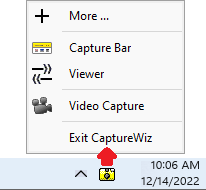
Corner icon functions
Left-click: |
|
Take screenshot |
Right-click: |
|
Open context menu |
When Recording
The corner icon flashes to let you know you're recording, plus it acts as a Stop button.
Tip
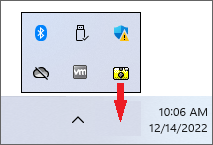
For better visibility and faster access, drag the CaptureWiz icon from the overflow menu to the taskbar
Customize the right-click function
1 On the capture bar, click Menu (≡) / Settings / Hot Keys / Taskbar Icon
2 Select your desired input and output tools.
What if there's no taskbar?
Press the WINDOWS key (  ) at the bottom left of most keyboards, to pop up the Windows taskbar anytime. With this tip, no application can take away control of your computer by hiding the taskbar, plus CaptureWiz is always available.